Suppose you are a reader who reads books, you know that the table of contents is one of the first elements a reader will use to navigate your document. The proper formatting of the TOC is not about listing chapter titles; it is about creating an organised structure that guides your readers through your document with ease. In this blog, we'll break down the essential formatting rules of the dissertation table of contents, along with a practical example to ensure your document looks polished.
What Is a Table of Content?
A Table of Contents is a list that shows all the sections and chapters of a document with their page numbers. It acts as a blueprint that helps readers find information quickly and understand the structure of the content. A good table of contents makes reading easier and saves time by showing what topics are covered and where to find them individually. When writing a table of contents for dissertation, the maximum length should be two pages.
What to Include & Exclude in the Table of Contents?
Crafting an effective table of contents involves knowing what to include and what to exclude. While it should highlight the main sections, it is crucial to avoid cluttering it with minor details that do not contribute to the overall performance.
What to Include in TOC?
- The main Sections or Chapters are the primary divisions of your document, usually formatted with Heading1.
- Subsections and subtopics are the secondary divisions under the main headings, typically formatted with Heading 2 or Heading 3.
- Each Heading in the TOC should include its corresponding page numbers. It enables readers to jump directly to the relevant sections.
What to Exclude in TOC?
- Exclude minor headings or paragraph titles because they add clutter.
- Avoid including image, table or figure captions, as they belong in separate lists and are not part of the main structure.
- Do not add footnotes, endnotes or in-text citations, since they support content but do not represent sections.
So, these are the components that you should include and exclude from your dissertation table of contents UK. You can also use this method for that you can take guidance PhD dissertation help to know the dissertation structure guide.
What Are the Levels of Heading?
A level of heading is a way to organise a document into clear sections so readers can easily follow the content. Each of these dissertation headings levels shows the importance of a section, starting from the main title to smaller subtopics of the dissertation contents page. In the sections below, you will learn about the different levels of headings:-
Level 1 Heading:- The main title or chapter heading of a document showing the most important sections for easy navigation.
Level 2 Heading:- Divides Level 1 into major sections or topics, and it helps readers to understand the main structure of the context clearly.
Level 3 Heading:- It breaks the Level 2 into smaller subtopics to provide more detail for making complex information easier to read.
Level 4 Heading:- Optional subdivisions are used for additional details or complex topics that need further organisation and clarity.
The above levels are the division of your table of contents that simplifies what you have mentioned.
How to Create Table of Content in Word?
Creating a table of contents in Microsoft Word is a process that helps you organise your document. Whether you are working on a dissertation, thesis or lengthy documents, you should know that Word offers powerful tools to automatically generate and update styles. With the help of the below step-by-step method, you can analyse how to make a dissertation table of contents in Word:-
Step 1: Use Heading Styles:
- Before inserting a TOC, make sure you have used Word's built-in Heading styles for your document's sections (e.g., Heading 1, Heading 2, Heading 3).
- Then, go to the Home tab and include titles in your dissertation table of contentsby selecting a heading style from the Styles
Step 2: Insert the Table of Contents
Place the cursor where you want write a dissertation title for table of contents in Word and follow the instructions below:-
- Go to the References Tab on the ribbon at the top of Word.
- In the Table of Contents group, click on the Table of Contents
- You will see several predefined TOC styles. You can select one of these options or click on Custom Table of Contents to further customise.
Step 3: Customize the Table of Contents
If you want more control over the table of contents dissertation format, click Custom Table of Contents from the TOC menu. It will allow you to:-
- Modify the style of the TOC.
- Choose how many heading levels you want to show.
- Format how page numbers appear.
So, with the help of these three simple steps, you can create a dissertation table of contents in Microsoft Word.
How to Update Table of Content Automatically?
Updating a Table of Contents automatically in MS Word keeps your document accurate. When you add, remove, or change headings, page numbers in the TOC may no longer match the content. In the pointers below, you will know how you can automatically update the changes in your table of contents dissertation format:-
- First click anywhere inside the table of content in your document.
- Go to the References tab in the Word ribbon.
- Click on Update Tableor the Update Table option that appears above the TOC.
- Choose Update Page Numbers Onlyif headings are unchanged, but page numbers have shifted.
- Choose Update entire table if you have added, removed or modified headings.
- Click OK to apply the updates and refresh the TOC automatically.
So, these are the steps from which you can switch your manual dissertation structure update to automatic.
What Are the Front Matter and Back Matter Sections of Table of Contents?
Creating a dissertation is not only about writing strong chapters; it is also about guiding your reader through the journey of your research. The front and back matter sections are the framework that offer important content before the main chapters begin. In the sections below, you will analyse several types of sections included in dissertation table of contents Word.
Appendices
Appendices are added at the end of a dissertation to hold extra material that supports your research. These appendices dissertation table of contents may include long transcripts, detailed data sets, sample questionnaires or supplementary explanations.
Tables
The tables are used for presenting information in a clear and organised grid that helps readers compare data. Instead of searching through long paragraphs, a table allows information to be understood at a glance.
Figures include charts, graphs and images that help you to illustrate your research more effectively. Like tables, figures are gathered in a list of figures dissertation, allowing readers to find every visual element without searching.
Checklist
A checklist may appear in some dissertations when a university requires students to confirm they followed specific formatting. This checklist can include items such as page layout, font requirements, or document structure.
To know the crafting methods you can take help from the dissertation examples which is mentioned below.
Table of Content Example
There are some major features of a table of contents that you should know before creating one.
- A title page
- Clear headers and subheadings
- Accurate page numbers of the dissertation.
If you want to see what the final structure will look like when you have completed making the dissertation TOC template check the example below:-
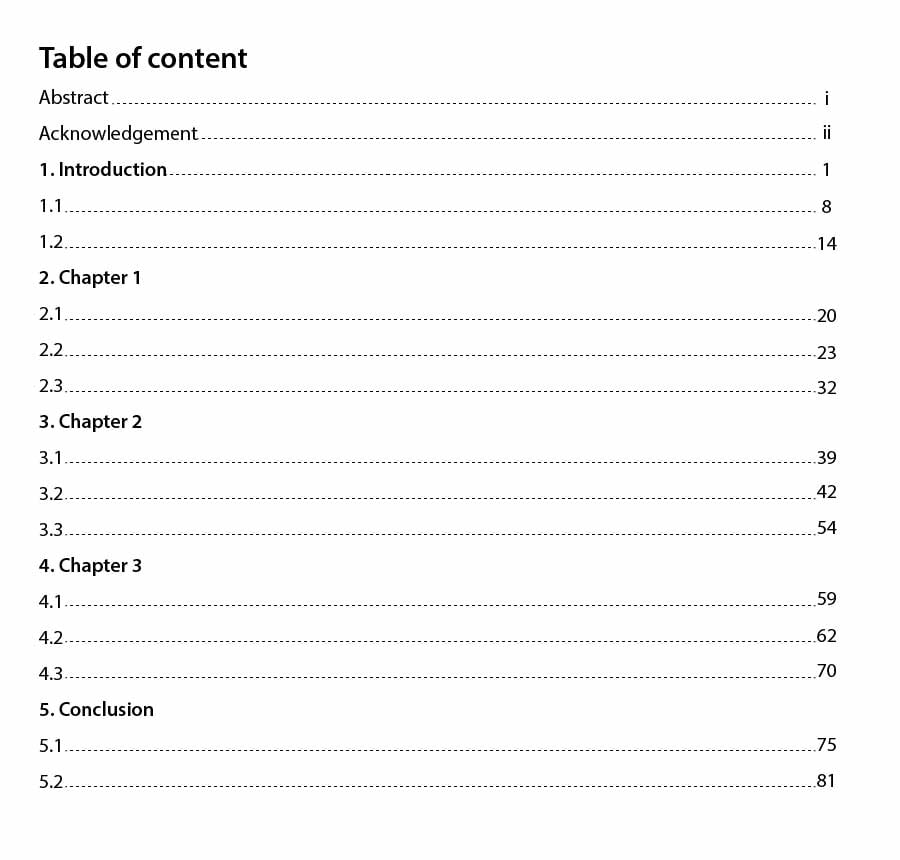
So, with the help of this dissertation table of contents example, you can make your dissertation more professional and clear. If you are still facing any doubts in making this list of tables dissertation, you can seek experts from dissertation writing help.
Conclusion
After knowing all the formatting rules, you now know that the table of contents is crucial for guiding readers through your dissertation. Microsoft Word's tools allow you to automatically generate and update your TOC, which saves you time. If you follow all the instructions and steps that are mentioned above, you can craft an accurate document according to the needs. If you face any struggles while doing this process, you can seek expert help from Assignment Desk. They have an immense knowledge of the formatting of different topics.



 Company











 Update your Number